TWIN Operator Console: Workspace for Chat Operators

In addition to communication automation, TWIN was developing an operator console: a working interface for employees who handle customer conversations in chats.
I was responsible for designing the operator console from scratch. I used the TWIN design system core to build product libraries and prepare desktop and mobile versions of the interface.
The main goal was to create a clear and reliable working tool for operators, with access to conversations, customer data, chat actions, working statuses, and key performance metrics.
🎯 Main Goals
As part of the work on the operator console, I focused on several key tasks:
- Create a clear interface for the daily work of chat operators
- Give operators quick access to customer information
- Add chat actions such as transferring a conversation to another operator, blocking a user, changing status, and other operations
- Show operators their work metrics
- Support basic working functions: pause status, customer comments, bot assistant, file attachments, customer waiting time, and other tools
- Adapt the interface for desktop and mobile scenarios

🚩 Problem
The operator console had to combine several types of information: customer conversation, customer profile, chat actions, service data, assistant suggestions, statuses, and work statistics.
The main risk was interface overload. If all functions were placed in one dense layout without a clear hierarchy, operators would struggle to navigate the interface and respond to customers efficiently.
For this type of product, it was critical that the interface did not interfere with the main task: communicating with the customer. Operators needed to find the right actions quickly, see the conversation context, and stay focused on the chat without unnecessary switching.
✅ Solution
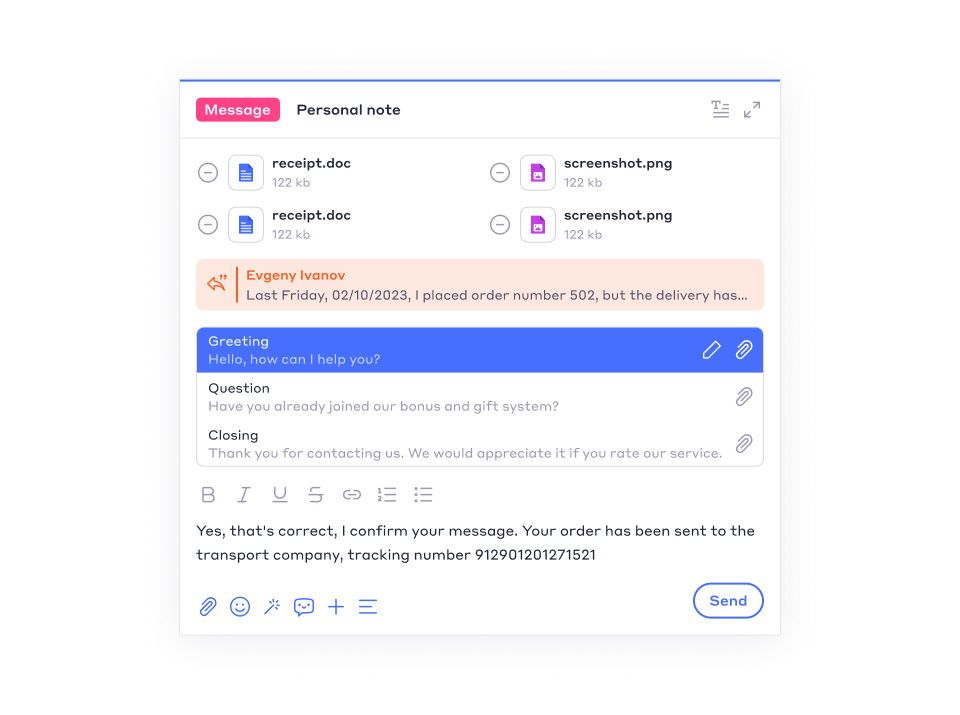
The design concept was built around an adaptive interface structure.
The main focus always remained on the chat. Side panels could be shown or hidden depending on the task: checking customer data, performing chat actions, reviewing metrics, or using additional tools.
The interface was designed as a working surface: important elements were placed nearby, but they did not cover the conversation. The operator always had access to the dialogue history and the customer’s current message.
This approach helped maintain a balance between functionality and interface clarity.
🔎 Key Interface Elements

The operator console included several main working areas:
- Active chat list
- Conversation area
- Customer profile
- Chat actions
- Operator working statuses
- Comments and service notes
- Bot assistant
- File attachment and sending
- Customer waiting time
- Operator performance metrics
Each element was integrated into the overall system so operators could switch between tasks quickly without losing the conversation context.
🖥️ Desktop and Mobile
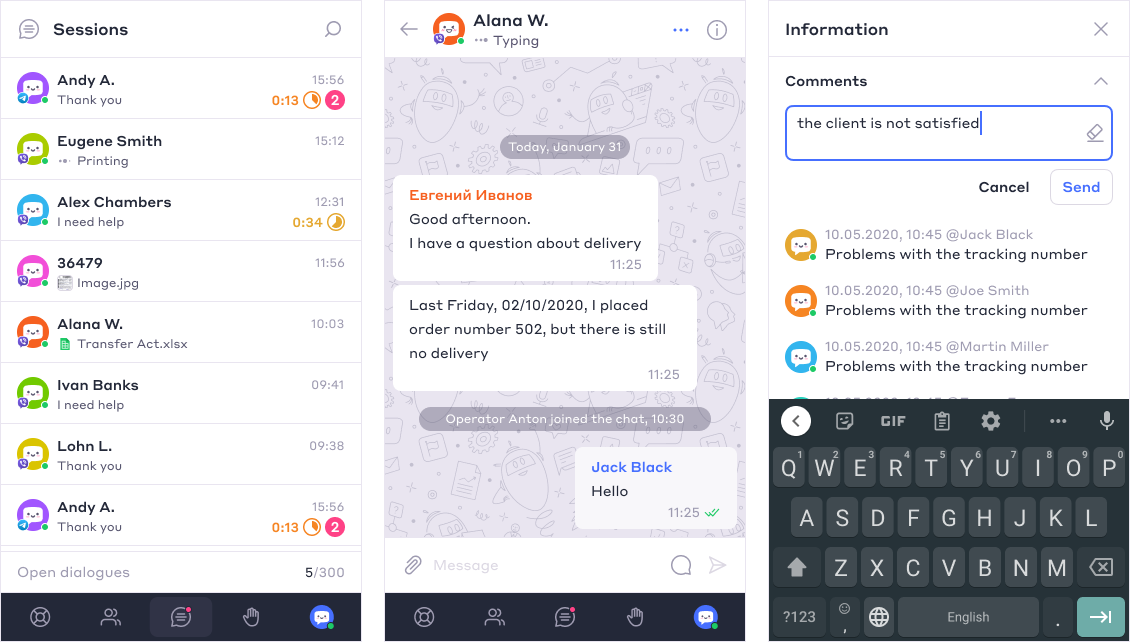
I prepared designs for both desktop and mobile versions of the operator console.
The desktop version was designed as a full operator workspace with several information areas. The mobile version kept access to key functions within a more limited screen space while preserving the core interaction logic.
Both versions used a shared product library based on the TWIN design system. This helped maintain visual and functional consistency across platforms.
📊 Result
As a result, the TWIN Operator Console was created as a working interface for handling customer conversations in chats.
The console allowed operators to see conversations, customer information, available actions, working statuses, and metrics in one clear interface.
Today, the operator console maintains a stable user base of around 1,500 MAU among operators, with approximately 15–20% monthly growth in new users.
For TWIN, this interface became an important part of the platform. It expanded the product beyond automation and added a full tool for live customer communication.